Membase x LangGraph: Shared Long-Term Memory for Multi-Agent Systems
langchain-membase brings Membase’s shared long-term memory to LangGraph. It gives LangGraph agents one memory that lasts beyond the thread and reaches beyond the app: several agents can share it, and the AI tools you use every day, such as Claude Code and Cursor, can read it too.
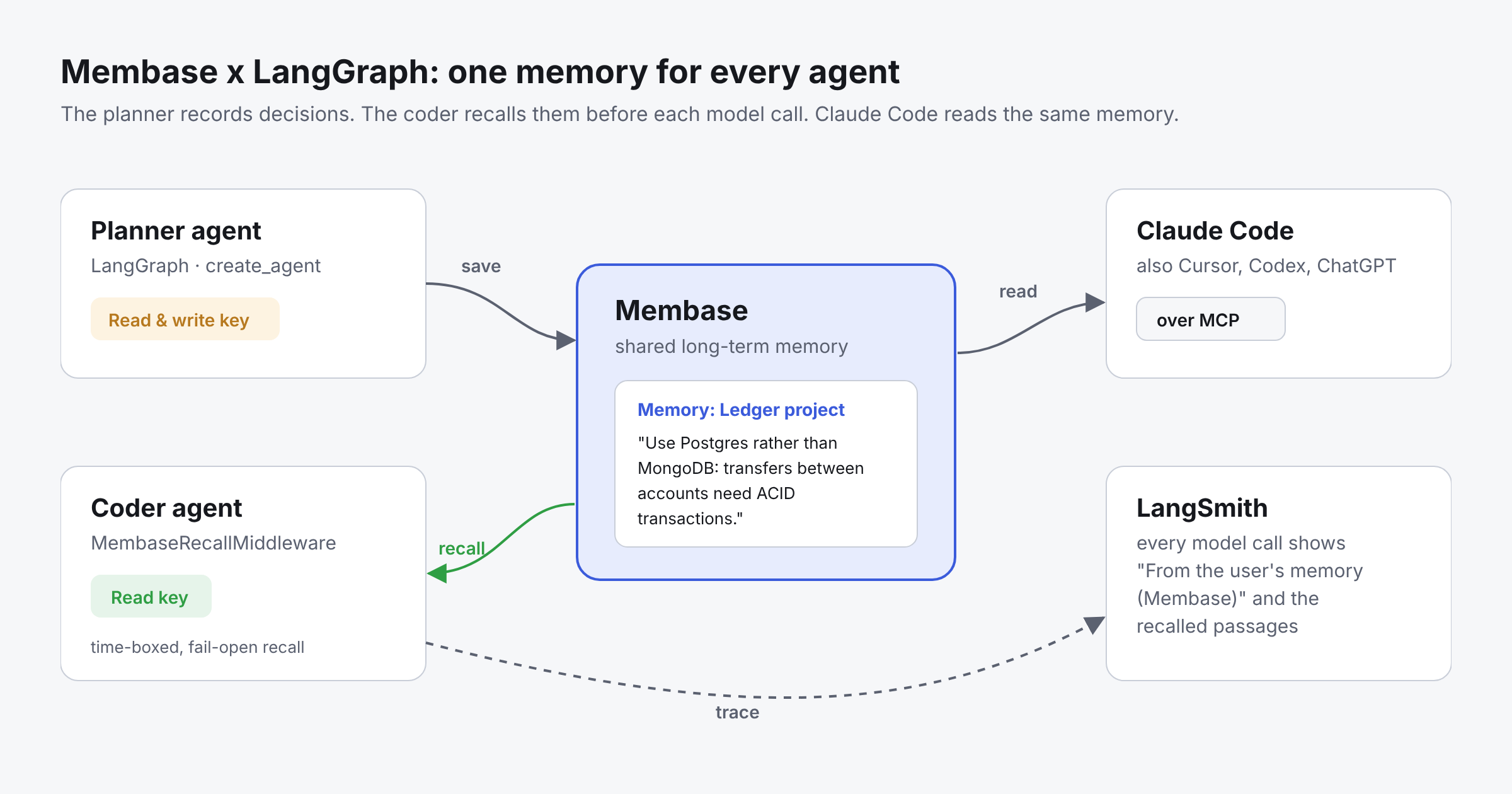
LangGraph orchestrates stateful, multi-agent workflows. Its checkpointers keep a thread’s state, and its stores keep data inside one application. Membase sits beside them as the memory layer that outlives the run: a planner agent records a decision on Monday, and on Tuesday a coder agent in a new thread, or Claude Code in your terminal, already knows it.
Why Membase for AI agents?
- One memory across agents, apps and tools. Every agent reaches the same Memory with its own key, and Claude Code, Cursor, Codex and ChatGPT read it over MCP.
- Access per agent. Give a planner a Read & write key and a coder a Read key. Revoke one key and the other agents keep working.
- Every recalled passage cites its source. Each passage names the Memory it came from, so an agent can tell the user where it learned a fact.
- Recall that never blocks the agent. The recall middleware is time-boxed and fail-open: if Membase does not answer in time, the model runs without memory.
- Hosted or local. Use the hosted service, or run Membase on your own machine.
How langchain-membase works
The package has three parts. Use any one of them, or all three together.
- MembaseRetriever. A LangChain retriever over the user’s Memories. Each Document carries the Memory it came from in metadata["memory_name"].
- Agent tools. membase_tools() gives an agent membase_search, membase_save and membase_profile. Turn any of them off, for example save=False for an agent that should only read. The save tool tells the model to save only when the user asks.
- MembaseRecallMiddleware. For LangChain v1 create_agent. Before each model call, it searches Membase for the latest user message and appends the passages to the system message. It never writes the recall into the agent's state or checkpoint.
For a multi-user app, pass client_for so each request uses that user's own key. A call without a user id is refused, never routed to another user.
Memory in practice: Building a planner and a coder that share decisions
What you will build:
- A planner agent that records decisions when you ask it to.
- A coder agent that recalls those decisions before every model call, but cannot change them.
- LangSmith traces that show exactly which memories each model call received.
- Claude Code connected to the same memory over MCP.
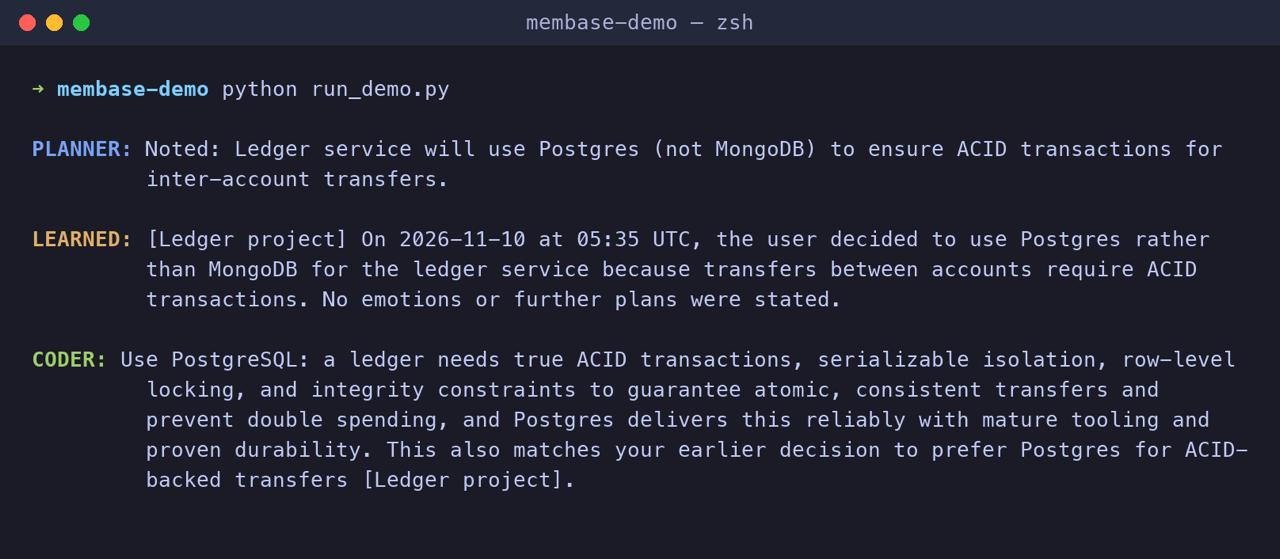
Here is the whole run, end to end:
Step 1: Install and create keys
pip install 'langchain-membase[agents]' langchain-openai
In the Membase app, create a Memory called “Ledger project”. Then, under Connect > Developer keys, create one key per agent:
- Planner: Read & write, reaching only “Ledger project”.
- Coder: Read, reaching “Ledger project”.
A key that reaches exactly one Memory saves there. A key that reaches several is refused rather than guessing, so give writer agents a key with one Memory in reach.
export MEMBASE_PLANNER_KEY=mbk_...
export MEMBASE_CODER_KEY=mbk_...
Step 2: Build the planner agent
import os
from langchain.agents import create_agent
from membase import Membase
from langchain_membase import membase_tools
planner_client = Membase(api_key=os.environ["MEMBASE_PLANNER_KEY"])

planner = create_agent(
    "openai:gpt-5",
    tools=membase_tools(planner_client, profile=False),
    system_prompt="You are the planner. When the user asks you to record a decision, save it with its reason.",
)
planner.invoke({"messages": [{"role": "user", "content":
    "Record this decision: the ledger service uses Postgres rather than MongoDB, "
    "because transfers between accounts need ACID transactions."}]})
The save tool’s description tells the model to save only when the user asks, so the planner does not fill memory with guesses. Membase accepts the note at once and learns it in the background, so it can take a short while before a search finds it.
When it has learned the note, Membase keeps it as a dated fact in the Memory, for example: “On 2026-11-10 at 05:35 UTC, the user decided to use Postgres rather than MongoDB for the ledger service because transfers between accounts require ACID transactions.”
Step 3: Build the coder agent with recall
from langchain_membase import MembaseRecallMiddleware

coder_client = Membase(api_key=os.environ["MEMBASE_CODER_KEY"])

coder = create_agent(
    "openai:gpt-5",
    tools=membase_tools(coder_client, save=False, profile=False),
    system_prompt="You are the coder on the ledger project. Answer in two sentences.",
    middleware=[MembaseRecallMiddleware(client=coder_client, k=5, timeout=8.0)],
)
result = coder.invoke({"messages": [{"role": "user", "content":
    "Which database should I use for the ledger service, and why?"}]})
print(result["messages"][-1].content)
Before each model call, the middleware searches Membase for the latest user message and appends the passages to the system message, each labelled with the Memory it came from. It is time-boxed and fail-open: if Membase does not answer within the timeout, the model runs without memory instead of hanging. The recall is never written into the agent’s state or checkpoint.
In our run, the coder answered with Postgres and ended with: “This also matches your earlier decision to prefer Postgres for ACID-backed transfers [Ledger project].” It cited the Memory the decision came from.
The coder’s key is Read, and it has no save tool, so it cannot change what the planner recorded.
Step 4: See what each agent remembered in LangSmith
export LANGSMITH_TRACING=true
export LANGSMITH_API_KEY=lsv2_...
Run the coder again and open the trace. The model call’s system message now ends with a section titled “From the user’s memory (Membase)”, listing each recalled passage with the Memory it came from:
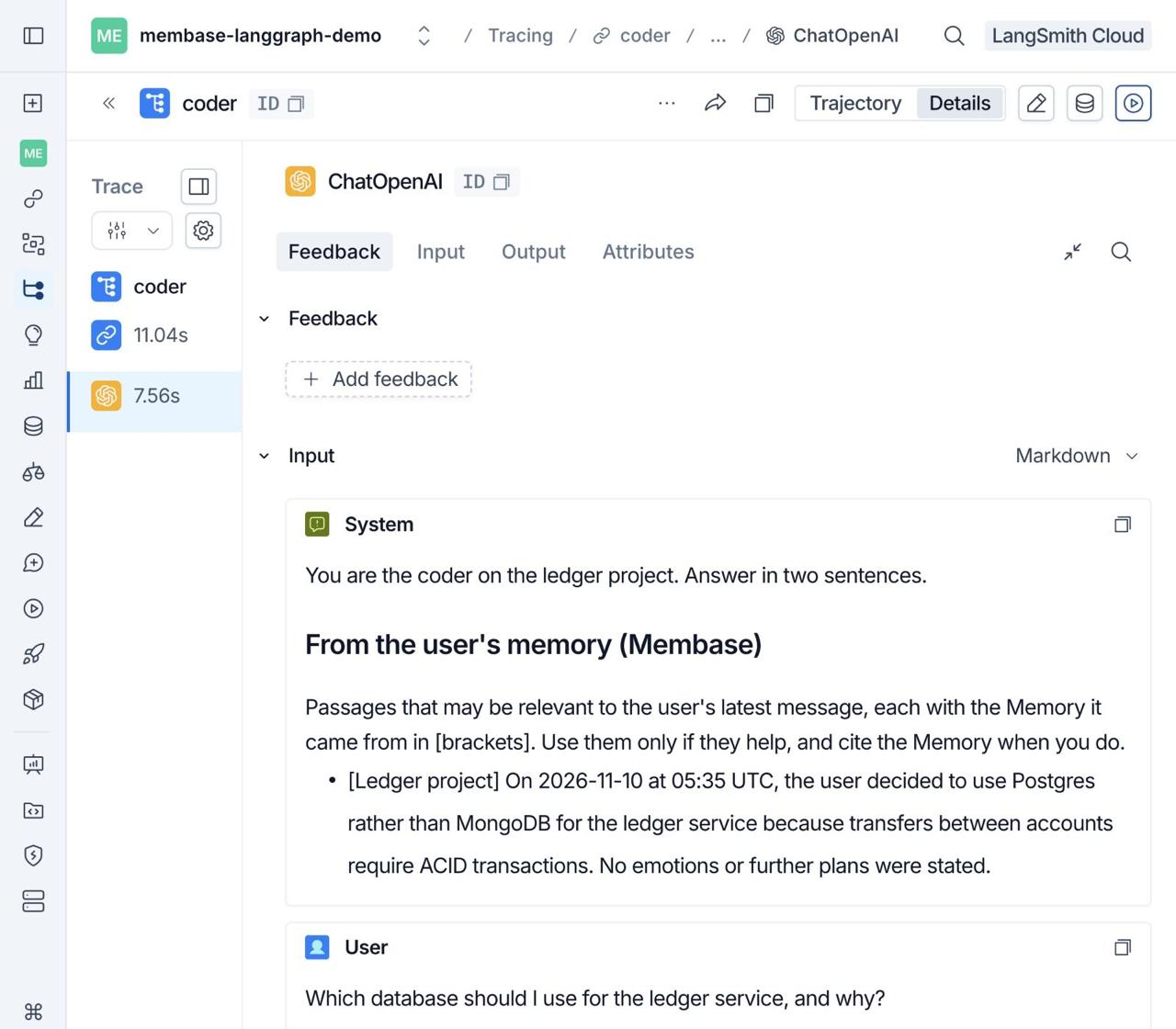
This is the fastest way to debug memory: when an agent ignores a decision, the trace shows whether the decision was recalled at all.
Step 5: Give Claude Code the same memory
claude mcp add --transport http membase https://api.app.membase.com/mcp-http
Claude Code opens your browser to approve access. Tick “Ledger project” and press Approve access. This connection is read-only, so Claude Code can search the memory but not change it.
Now the decision your planner recorded is there when you ask Claude Code about the ledger service. Setup for Cursor, Codex, ChatGPT and other clients is in Connect your AI.
Keep checkpointers for the thread
Use both:
- A checkpointer holds the current conversation, so a thread can resume.
- Membase holds what should outlast the thread and be shared with other agents and tools.
Limits to know
- It is not a message bus. New memory is learned in the background. For agents that must coordinate within seconds, pass the message directly and save the outcome afterwards.
- One key is one person’s account. For a multi-user app, pass client_for so each request uses that user’s own key; a call without a user id is refused, never routed to someone else.
- Searches cannot filter on metadata. Put the project, date or owner into the text you save.
Resources
- langchain-membase on GitHub: retriever, agent tools and recall middleware
- Membase in LangChain’s integrations: listed as MembaseRetriever
- LangChain and LangGraph Memory: checkpointers, stores and LangMem, with code
- How to Share Memory Between Multiple AI Agents: per-agent keys and one shared memory
Quick links
Get started
- Get started with Membase: create a Memory and connect your first AI. Free during the beta; paid plans are coming soon.
- Membase Chrome Extension: save and reuse context in ChatGPT, Claude, Gemini, Grok, DeepSeek and Kimi
- Connect your AI: setup guides for ChatGPT, Claude, Claude Code, Cursor, Codex and Grok
- MCP server: setup guide · endpoint https://api.app.membase.com/mcp-http
- Your first Memory: the app quickstart
- What Is Cross-AI Memory?: the idea behind one memory across AI assistants
For developers
- Get an API key: Membase Web App → Connect › Developer keys
- Python SDK: unibaseio-membase on PyPI · pip install unibaseio-membase
- TypeScript SDK: @unibaseio/membase on npm · npm install @unibaseio/membase
- CLI: @unibaseio/membase-cli on npm · npm install -g @unibaseio/membase-cli
- API quickstart · SDK reference: methods, REST routes and MCP tools
- Source and examples: github.com/unibaseio/membase · Membase use cases on GitHub
- Membase Research: benchmarking long-term memory for agents
Videos
- How to Add Long-Term Memory to an AI Agent with the Membase SDK in 1 Minute
- Give Claude Code Permanent Memory in 60 Seconds (MCP)
Help