
Membase x Hermes Agent: Long-Term Memory for AI Agents
You tell Hermes about your project, your preferences and your plans. Hermes keeps notes in MEMORY.md and USER.md on the machine it runs on. Then you open Claude Code, ChatGPT or Cursor, and none of it is there.
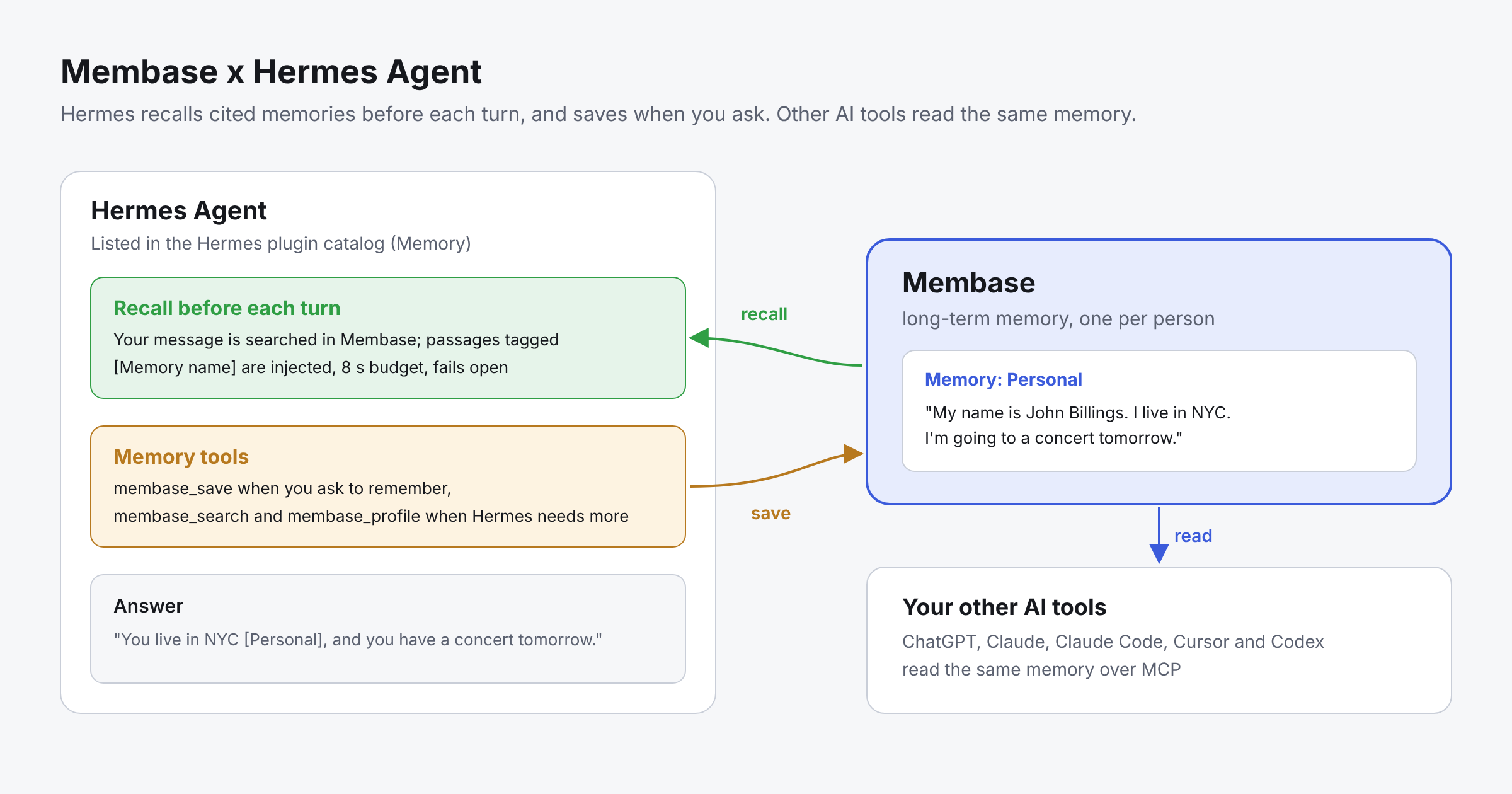
Membase gives Hermes long-term memory that every AI you use shares. Before each turn, Hermes searches your Membase memory and gets back passages that cite the Memory each fact came from. It saves only when you ask. Membase is listed in the Hermes plugin catalog, the human-reviewed directory of Hermes plugins, under Memory, added in PR #144472 and updated in PR #148800.
Quick answer
- Create a Memory and a developer key in the Membase app.
hermes plugins install unibaseio-membasehermes memory setup unibaseio-membaseand paste the key.- Start a new session. Hermes now recalls from Membase before each turn and has membase_search, membase_save and membase_profile.
- Ask Claude Code the same question: the memory is the same.
Why Membase for AI agents?
- Memory that outlasts one agent. What you tell Hermes is there for Claude Code, ChatGPT, Cursor and every other AI that reaches the same Memory, on any device.
- Every recalled passage cites its source. Each passage names the Memory it came from, so Hermes can tell you where it learned a fact.
- Saves only what you ask to keep. Hermes calls membase_save when you ask it to remember something. Saving every turn is a setting you turn on yourself.
- Never slows a turn down. Recall has a short time budget, 8 seconds by default. If the search is slow or fails, the turn goes on without memory.
- Control over what Hermes can do. A Read key can only search. A Read & write key can also save. You choose which Memories the key reaches, and you can revoke it at any time.
How Membase works with Hermes
Hermes runs one external memory provider at a time, next to its built-in MEMORY.md and USER.md. With Membase as the provider:
- Recall before each turn: Hermes sends your message to Membase and injects up to 5 passages, each tagged with its Memory, for example [Project decisions] We settled on Postgres for the ledger. Greetings, "thanks" and slash commands are skipped.
- membase_search: Searches every Memory the key reaches when Hermes needs more than the recall gave it.
- membase_save: Saves a note when you ask Hermes to remember something.
- membase_profile: Reads your profile: standing facts about who you are, newest first.
- Turn capture (optional): With capture_turns on, your own words from each turn are saved. Hermes' replies are never sent. Off by default.
The plugin talks only to the Membase API. Your key stays in Hermes’ secret store, and the only local file is the plugin’s settings file. It starts no background process and sends no telemetry.
Memory in practice: Giving Hermes memory that every AI shares
What you will set up:
- Hermes recalling cited memories before each turn.
- Saving when you ask, and searching when Hermes needs more.
- Claude Code reading the same memory.
Step 1: Create a Memory and a key
In the Membase app, create a Memory, for example “Personal”. Then open Connect › Developer keys and create a key:
- Choose Read & write if Hermes should save memories, or Read if it should only search.
- A key that should save must reach exactly one Memory, which becomes its write target. A key that reaches several Memories can search them all but cannot save.
- Tick profile if you want membase_profile to work.
Step 2: Install the plugin
Membase needs Hermes 0.22.2 or later.
hermes plugins install unibaseio-membase
This installs the plugin at the commit the Hermes team reviewed, together with the Membase Python SDK, and can set Membase as your memory provider.
Step 3: Set it up
hermes memory setup unibaseio-membase
Paste your key when asked. It is stored in your Hermes profile’s secret store, never in the settings file. Then check what is active:
hermes memory status
Start a new session so Hermes picks up the provider.
Step 4: Tune recall (optional)
The settings live in $HERMES_HOME/unibaseio-membase.json. The defaults work for most people:
{
  "auto_recall": true,
  "recall_limit": 5,
  "recall_budget_seconds": 8,
  "capture_turns": false
}
- auto_recall (default true): Search before each turn
- recall_limit (default 5): Passages injected per turn
- recall_budget_seconds (default 8): How long recall may take (0.5 to 8)
- capture_turns (default false): Save your own words from every turn
- recall_mode (default full): fast skips the model call on search and hands Hermes more passages to judge
- tools (default on): off removes the membase_* tools and leaves memory to recall alone
Step 5: Give Claude Code the same memory
claude mcp add --transport http membase https://api.app.membase.com/mcp-http
Claude Code opens your browser to approve access. Tick “Personal” and approve. This connection is read-only, so Claude Code can search the memory but not change it. Setup for Cursor, Codex, ChatGPT and other clients is in Connect your AI.
Step 6: Verify that memory is working
- In Hermes, say: “Remember that I prefer window seats when I fly.” Hermes should say it saved it.
- Wait a short while for Membase to learn it.
- Start a new Hermes session and ask: “Where do I like to sit when I fly?”
- The answer should say window seats and cite the Memory it came from.
- Ask Claude Code, connected in Step 5, the same question. The answer is the same, because the fact lives in Membase, not in Hermes.
Memory types in Hermes: Built-in memory and Membase
Built-in MEMORY.md and USER.md
- Lives in files in your Hermes profile, on one machine
- Keeps notes Hermes writes about its work and about you
- Shared only within that Hermes profile, not with other AI tools
- Does not cite sources
- Good for Hermes’ own working notes
Membase
- Lives in your Membase account
- Keeps long-term memory learned from what you save
- Shared across Hermes, other agents, apps and AI tools: ChatGPT, Claude, Claude Code, Cursor and Codex over MCP
- Cites the Memory each passage came from
- Good for memory that every AI you use should know
The two work side by side. Hermes keeps its built-in memory, and Membase adds memory that reaches beyond it.
Common mistakes
The key reaches several Memories, so nothing is saved
A key can save only when it reaches exactly one Memory. If it reaches several, search works but membase_save is refused, and Hermes says so. Give the key one Memory under Connect › Developer keys.
Expecting recall on the very first turn
The first search after a quiet spell takes longer while your memory wakes up. Recall gives up after its time budget, so the first turn or two of a session may run without it. Later turns find the memory awake. An explicit membase_search waits longer.
Searching right after saving
Membase learns new notes in the background. A search a second after a save may not find the note yet. Wait a short while, then search.
One profile answering many people
One Membase key is one person’s memory. If one Hermes profile answers a group chat or a shared bot, everyone in it reaches the owner’s memory. Give each person their own Hermes profile and key.
Running two memory providers
Hermes runs one external memory provider at a time. If another provider is active, switch with hermes memory setup.
Building better agents with long-term memory
Agents feel forgetful when every tool starts from zero. With Membase, you tell Hermes something once, and Claude Code, ChatGPT, Cursor and every other AI you connect start from the same context, with the source of each fact cited. Hermes keeps running your agent, its built-in memory keeps its own notes, and Membase keeps what you want every AI to know.
What people build with it:
- Personal assistant. Hermes on your server or messaging app knows your plans and preferences, and so does Claude on your laptop.
- Coding agent. Save project decisions once. Hermes and Claude Code both recall them, with the Memory each came from.
- Research agent. Save sources and conclusions as you go, then pick up next week in Hermes, ChatGPT or Cursor.
Getting started
- Create a free key in the Membase app under Connect › Developer keys.
hermes plugins install unibaseio-membasehermes memory setup unibaseio-membase, then run the test in Step 6.
The full settings and behaviour are on the Membase page in the Hermes plugin catalog.
Resources
- Membase in the Hermes plugin catalog: install command, settings and behaviour
- PR #144472 on NousResearch/hermes-agent: adding Membase to the Hermes plugin catalog, merged
- PR #148800 on NousResearch/hermes-agent: updating the Membase plugin to 0.3.0, merged
- Plugin source on GitHub: the provider’s code and README
- Hermes memory providers: how external memory works in Hermes
- Membase x Agno: Long-Term Memory for AI Agents: the same memory in Agno
- Membase x Microsoft Agent Framework: Long-Term Memory for AI Agents: the same memory in Agent Framework
- Membase x Strands Agents: Long-Term Memory for AI Agents: the same memory in Strands Agents
Quick links
Get started
- Get started with Membase: create a Memory and connect your first AI. Free during the beta; paid plans are coming soon.
- Membase Chrome Extension: save and reuse context in ChatGPT, Claude, Gemini, Grok, DeepSeek and Kimi
- Connect your AI: setup guides for ChatGPT, Claude, Claude Code, Cursor, Codex and Grok
- MCP server: setup guide · endpoint https://api.app.membase.com/mcp-http
- Your first Memory: the app quickstart
- What Is Cross-AI Memory?: the idea behind one memory across AI assistants
For developers
- Get an API key: Membase Web App → Connect › Developer keys
- Python SDK: unibaseio-membase on PyPI · pip install unibaseio-membase
- TypeScript SDK: @unibaseio/membase on npm · npm install @unibaseio/membase
- CLI: @unibaseio/membase-cli on npm · npm install -g @unibaseio/membase-cli
- API quickstart · SDK reference: methods, REST routes and MCP tools
- Source and examples: github.com/unibaseio/membase · Membase use cases on GitHub
- Membase Research: benchmarking long-term memory for agents
Videos
- How to Add Long-Term Memory to an AI Agent with the Membase SDK in 1 Minute
- Give Claude Code Permanent Memory in 60 Seconds (MCP)
Help