
Membase x Agno: Long-Term Memory for AI Agents
A user tells your Agno agent their name, their city and their plans. Next week they come back through a different app, or ask Claude Code instead, and nothing they said is there. Agno can keep user memories in your own database, but that memory stays inside one Agno app.
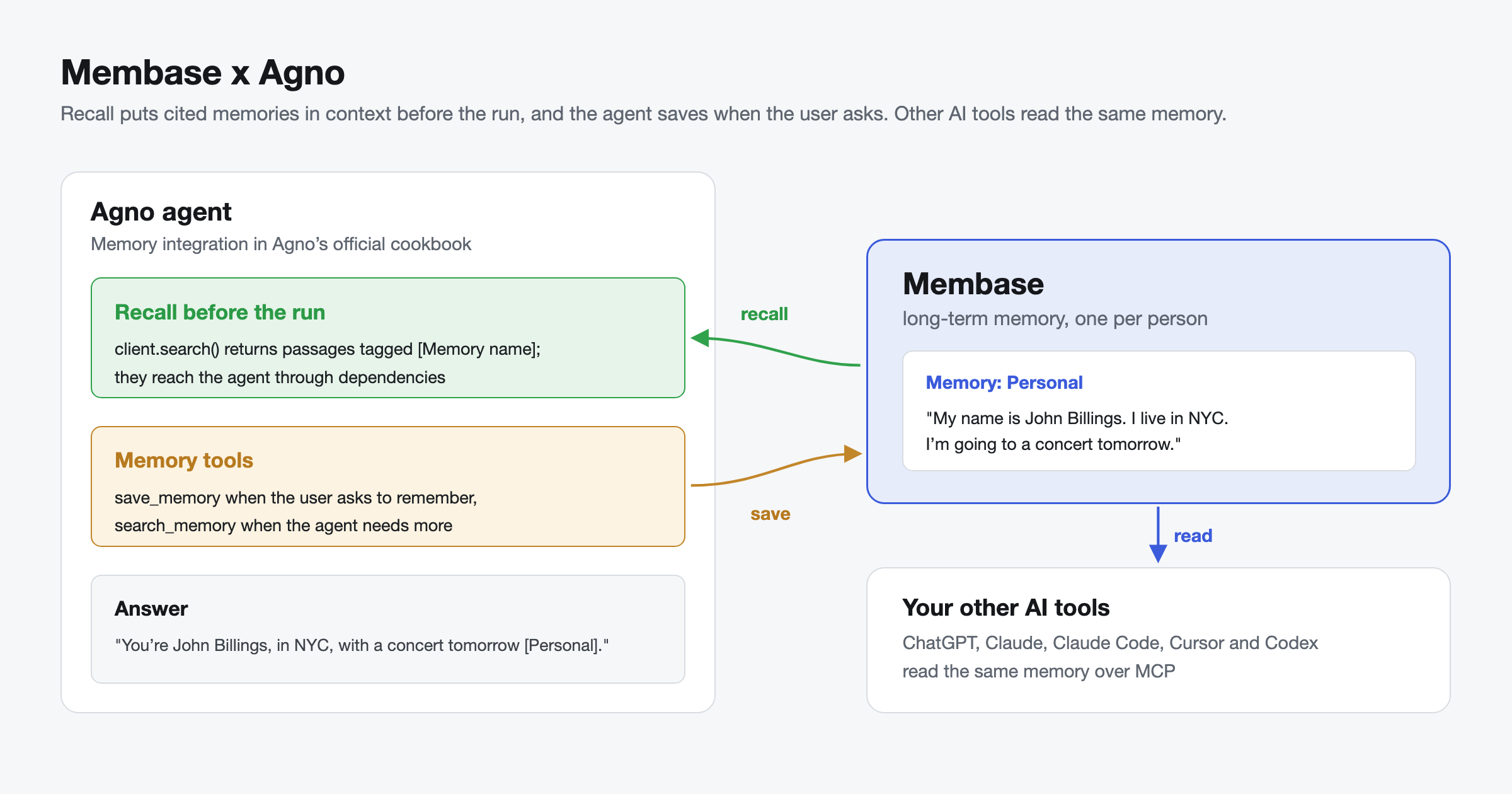
Membase gives Agno agents long-term memory that every tool can share. The agent recalls what the user said before it answers, cites the Memory each fact came from, and saves only when the user asks. Membase is one of the memory integrations in Agno’s official cookbook, added in PR #11552 and listed next to Mem0, Zep and Memori.
Quick answer
- Create a Memory and a developer key in the Membase app.
pip install agno openai unibaseio-membase- Search Membase before the run and pass the cited passages to the agent as context.
- Give the agent save_memory and search_memory tools for the rest.
- Run it in a new session, or ask Claude Code: the memory is the same.
Why Membase for AI agents?
- Memory that outlasts the app. What a user tells one Agno agent is there for every other agent, app and AI tool that reaches the same Memory.
- Every recalled passage cites its source. Each search result names the Memory it came from, so the agent can tell the user where it learned a fact.
- Saves only what the user asks to keep. Saving is a tool the model calls when the user asks to remember something, so memory does not fill with guesses.
- Control over what each agent can do. A Read key can only search. A Read & write key can also save. You choose which Memories each key reaches, and you can revoke a key at any time.
- Hosted or local. Use the hosted service, or keep memory on your own machine with local mode.
How Membase works with Agno
The integration uses the Membase Python SDK directly, with two building blocks:
| Building block | What it does |
|---|---|
| Recall before the run | client.search() returns the passages that answer a question, each tagged with the Memory it came from. Pass them to the agent through dependencies, so they are in context from the first token. |
| Memory tools | Two plain Python functions, save_memory and search_memory, that Agno turns into tools. The model saves when the user asks and searches when it needs more than the recall gave it. |
This is the same pattern as the example in Agno’s cookbook at cookbook/11_memory/integrations/membase_integration.py.
Memory in practice: Building an Agno agent that remembers
What you will build:
- An agent that recalls cited memories before it answers.
- Tools that save only when the user asks, and search when the agent needs more.
- Claude Code connected to the same memory.
Step 1: Create a Memory and a key
In the Membase app, create a Memory, for example “Personal”. Then open Connect › Developer keys and create a key:
- Choose Read & write if the agent should save memories, or Read if it should only search.
- A key that should save must reach exactly one Memory, which becomes its write target. A key that reaches several Memories can search them all but cannot save.
Step 2: Install
pip install agno openai unibaseio-membase
export MEMBASE_API_KEY=mbk_...
export OPENAI_API_KEY=sk-...
Step 3: Add some memories
from membase import Membase

client = Membase()  # reads MEMBASE_API_KEY from the environment

for note in [
    "My name is John Billings.",
    "I live in NYC.",
    "I'm going to a concert tomorrow.",
]:
    client.memories.add(note)
Membase accepts each note at once and learns it in the background, so give it a short while before you search.
Step 4: Recall before the run
from agno.agent import Agent
from agno.models.openai import OpenAIChat
from membase import Membase

client = Membase()

results = client.search("What do you know about the user?", limit=10)
memory = [f"[{item['memory_name']}] {item['content']}" for item in results["items"]]

agent = Agent(
    model=OpenAIChat(),
    instructions="When you use a fact from memory, say which Memory it came from.",
    dependencies={"memory": memory},
    add_dependencies_to_context=True,
)

agent.print_response("What do you know about me?")
The agent answers with John’s name, city and plans, and cites the Memory each fact came from, for example [Personal].
Step 5: Give the agent memory tools
Recall covers what you searched for before the run. For everything else, give the agent two tools:
from agno.agent import Agent
from agno.models.openai import OpenAIChat
from membase import Membase

client = Membase()

def save_memory(fact: str) -> str:
    """Save one fact about the user to long-term memory. Only call this when the user asks you to remember something."""
    client.memories.add(fact)
    return "Saved."

def search_memory(query: str) -> str:
    """Search the user's long-term memory. Each result names the Memory it came from."""
    results = client.search(query, limit=5)
    return "\n".join(f"[{item['memory_name']}] {item['content']}" for item in results["items"]) or "Nothing found."

agent = Agent(
    model=OpenAIChat(),
    instructions="Search memory before answering anything about the user. Cite the Memory each fact came from.",
    tools=[save_memory, search_memory],
)
agent.print_response("Remember that I prefer window seats when I fly.")
Agno reads each function’s docstring as the tool description, so the model knows to save only when asked.
Step 6: Give Claude Code the same memory
claude mcp add --transport http membase https://api.app.membase.com/mcp-http
Claude Code opens your browser to approve access. Tick “Personal” and approve. This connection is read-only, so Claude Code can search the memory but not change it. Setup for Cursor, Codex, ChatGPT and other clients is in Connect your AI.
Step 7: Verify that memory is working
- Run Step 5 and confirm the agent says it saved the window seat preference.
- Wait a short while for Membase to learn it.
- Start a new agent and ask: “Where do I like to sit when I fly?”
- The answer should say window seats and cite the Memory it came from.
- Ask Claude Code, connected in Step 6, the same question. The answer is the same, because the fact lives in Membase, not in the agent.
Memory types in Agno: Sessions, user memories and Membase
| Session history | Agno user memories | Membase | |
|---|---|---|---|
| What it keeps | The messages of one session | Facts about a user, stored in your database | Long-term memory learned from what users save |
| How long it lasts | The session | Until you delete it | Until the user deletes it |
| Shared across | One session | Agents that use the same database | Agents, apps, frameworks and AI tools |
| Shared with other AI tools | No | No | Yes: ChatGPT, Claude, Claude Code, Cursor and Codex over MCP |
| Good for | Follow-up questions | Personalization inside one Agno app | Memory that every tool should know |
Keep Agno’s session history for the current conversation, and its user memories if one app is enough. Add Membase when the memory should reach every agent and tool the user works with.
Common mistakes
The key reaches several Memories, so nothing is saved
A key can save only when it reaches exactly one Memory. If it reaches several, search works but saving does not. Give writer agents a key with one Memory in reach.
Searching right after saving
Membase learns new notes in the background. A search a second after a save may not find the note yet. Wait a short while, then search.
Sharing one key across all users
One key is one person’s memory. For an app with many users, give each user their own Membase key and create the client per user, for example Membase(api_key=user_key).
Saving every message
Saving everything fills memory with noise. Keep save_memory for facts the user asks you to remember, as the docstring says.
Building better agents with long-term memory
Agents feel forgetful when every app starts from zero. With Membase, a fact is saved once and every Agno agent, every app and every AI tool the user works with starts from the same context, with the source of each fact cited. Agno keeps orchestrating the agent, sessions keep the conversation, and Membase keeps what your users told you.
What teams build with it:
- Personal assistant. Save the user’s preferences and plans when they ask. Every agent knows them, and so does Claude.
- Customer support agent. Save each customer’s preferences with one key per customer. Recall them before every reply, so customers never repeat themselves.
- Research agent. Save sources and conclusions as you go. Pick up next week where you left off, in Agno or in Claude Code.
Getting started
- Create a free key in the Membase app under Connect › Developer keys.
pip install agno openai unibaseio-membase- Follow the steps above, then run the test in Step 7.
The full example is in Agno’s cookbook: membase_integration.py.
Resources
- Membase example in Agno’s cookbook: the full integration example
- PR #11552 on agno-agi/agno: adding Membase to Agno’s memory integrations, merged
- Agno: the framework
- Membase x Microsoft Agent Framework: Long-Term Memory for AI Agents: the same memory in Agent Framework
- Membase x LangGraph: Shared Long-Term Memory for Multi-Agent Systems: the same memory in LangGraph agents
- Membase x Hermes Agent: Long-Term Memory for AI Agents: long-term memory for Hermes Agent
- Membase x Strands Agents: Long-Term Memory for AI Agents: the same memory in Strands Agents
Quick links
Get started
- Get started with Membase: create a Memory and connect your first AI. Free during the beta; paid plans are coming soon.
- Membase Chrome Extension: save and reuse context in ChatGPT, Claude, Gemini, Grok, DeepSeek and Kimi
- Connect your AI: setup guides for ChatGPT, Claude, Claude Code, Cursor, Codex and Grok
- MCP server: setup guide · endpoint https://api.app.membase.com/mcp-http
- Your first Memory: the app quickstart
- What Is Cross-AI Memory?: the idea behind one memory across AI assistants
For developers
- Get an API key: Membase Web App → Connect › Developer keys
- Python SDK: unibaseio-membase on PyPI · pip install unibaseio-membase
- TypeScript SDK: @unibaseio/membase on npm · npm install @unibaseio/membase
- CLI: @unibaseio/membase-cli on npm · npm install -g @unibaseio/membase-cli
- API quickstart · SDK reference: methods, REST routes and MCP tools
- Source and examples: github.com/unibaseio/membase · Membase use cases on GitHub
- Membase Research: benchmarking long-term memory for agents
Videos
- How to Add Long-Term Memory to an AI Agent with the Membase SDK in 1 Minute
- Give Claude Code Permanent Memory in 60 Seconds (MCP)
Help