
Membase x Dify: How to Add Long-Term Memory to Dify Agents and Workflows
A customer tells your Dify support bot that their team wants reports every Monday, sent to the finance channel. A week later they open a new conversation, and the bot asks the same questions again. Dify keeps the current conversation in context, but nothing carries over to the next one.
The Membase plugin fixes that. It brings long-term memory to Dify agents and workflows, so what a user said last week is there today, with the source of every memory cited. The plugin is live on Dify Marketplace and Verified by Dify.
Quick answer
- Create a Memory and a developer key in the Membase app.
- Install Membase from Dify Marketplace.
- Authorize the plugin with your key.
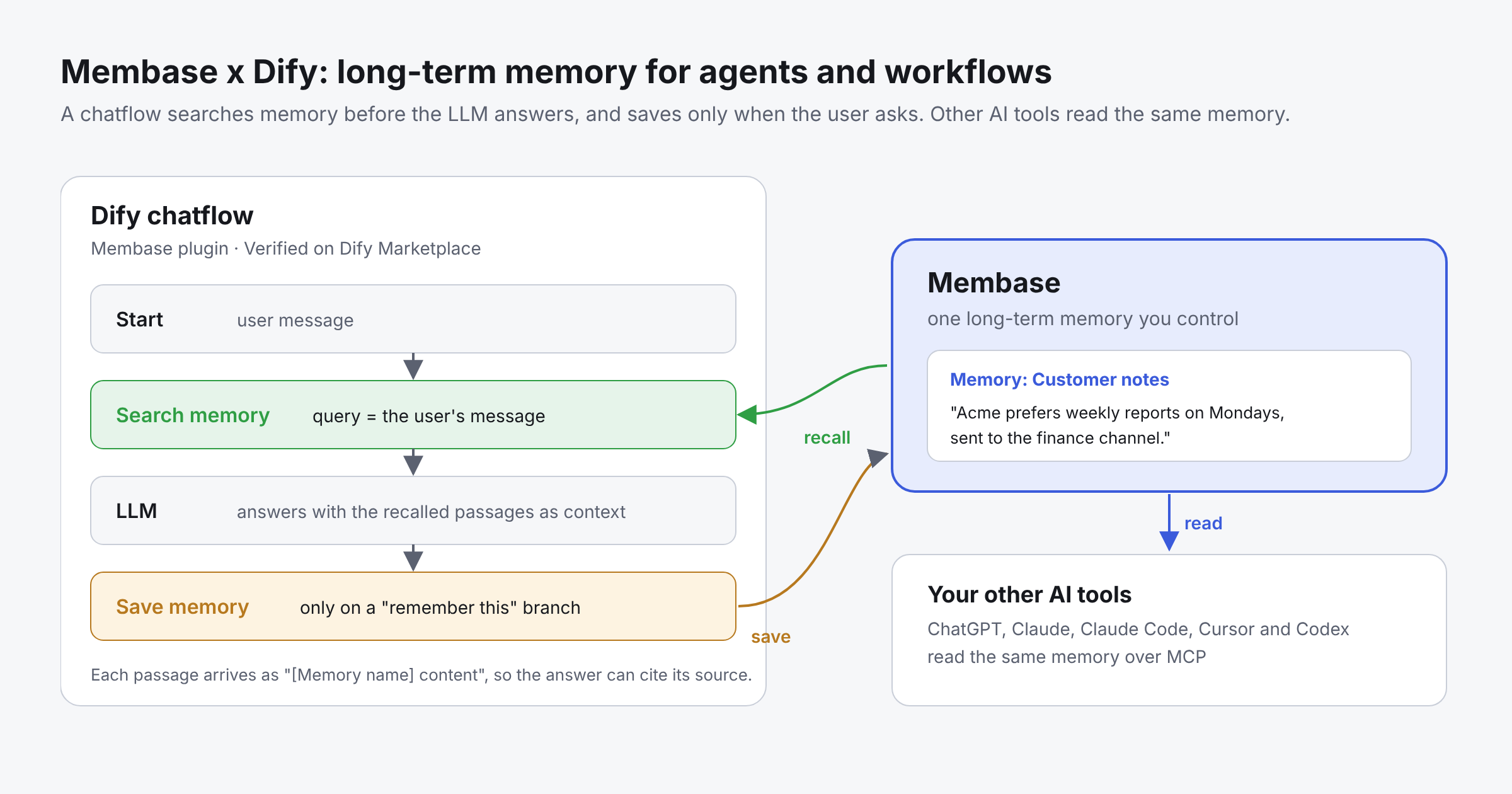
- Add Search memory before your LLM, and Save memory for when the user asks to remember something.
- Test it in a new conversation: the answer should cite the Memory it came from.
What memory does Dify have today?
Dify gives you three ways to keep context. Each is good at one job:
| Built-in memory | Conversation variables | Knowledge base | |
|---|---|---|---|
| What it keeps | Recent messages of the current conversation | Values your flow sets during a conversation | Documents you upload |
| How long it lasts | The current conversation | The current conversation | Until you change the documents |
| Learns from users | No | Only what your flow writes | No |
| Good for | Follow-up questions | Form state, counters, flags | Product docs, policies, FAQs |
None of them remembers what a user told your app in an earlier conversation. That is the gap long-term memory fills: preferences, decisions and facts about a user that should still be known next week, in any conversation or app.
Why Membase for Dify agents?
- Memory that outlasts the conversation. What a user says today is there next week, in a new conversation or another Dify app.
- Saves only what the user asks to keep. The save tool tells the model to save only when the user asks to remember something, so memory does not fill with guesses.
- Every recalled passage cites its source. Each passage names the Memory it came from, so the answer can tell the user where it learned a fact.
- Control over what each app can do. A Read key can only search. A Read & write key can also save. You choose which Memories each key reaches, and you can revoke a key at any time.
- One memory across Dify and your other AI tools. ChatGPT, Claude, Claude Code, Cursor and Codex read the same memory over MCP.
How the Membase plugin works
The plugin adds three tools to Dify. They work like any other tool node, with no code:
| Tool | What it does |
|---|---|
| Search memory | Finds the passages that answer a question, across every Memory the key reaches, most relevant first. Each passage names the Memory it came from. |
| Save memory | Saves one fact, in the user's words, to the key's Memory. Only when the user asks. |
| Get user profile | Reads the profile facts: standing statements about who the user is, newest first. |
Each tool returns a readable text output and a json output. In the text output, every passage looks like [Memory name] content, so an LLM node can quote the source directly.
There is no delete tool. Deleting memory is done by the account owner in the Membase app.
How to add long-term memory to a Dify agent
Prerequisites
- A Dify workspace that can install plugins, on Dify Cloud or self-hosted.
- A free Membase account at app.membase.com, with a working model under AI Setup.
- For self-hosted Dify: outbound HTTPS to api.app.membase.com on port 443.
Step 1: Create a Memory and a key
In the Membase app, create a Memory, for example “Customer notes”. Then open Connect › Developer keys and create a key:
- Choose Read & write if the app should save memories, or Read if it should only search.
- Choose which Memories the key may reach. A key that should save must reach exactly one Memory, which becomes its write target.
- Tick the profile if the app should read it.
Step 2: Install the plugin
In Dify, open Plugins › Marketplace, search for Membase and install it. The plugin carries the Verified by Dify badge.
Step 3: Authorize it
Open Plugins › Membase › Authorize (or Tools › Membase) and enter:
| Field | Required | Value |
|---|---|---|
| Membase API key | Yes | The key from Step 1, starting with mbk_ |
| Base URL | No | Leave empty for the Membase cloud |
Dify checks the key against the Membase API when you save. A mistyped, expired or revoked key is rejected at this step.
Step 4: Add memory to an agent
In an Agent app, add Search memory, Get user profile and, if the key can write, Save memory to the agent’s tools.
The tool descriptions already tell the model when to use each one: read the profile once near the start, search before answering anything that depends on what the user said before, and save only when the user asks to remember something. Add one line to the instructions:
Cite the Memory name when you use a memory.
Step 5: Or build a memory loop in a chatflow
For more control, build the loop yourself:
- A Search memory tool node, with the user’s message as query. You can set limit from 1 to 50 passages.
- An LLM node that receives the search node’s text output as context.
- Optionally, a Save memory node on a branch that runs only when the user asks to remember something, with the fact as content.
Keep Dify’s built-in memory switched on in the LLM node for the current conversation. Membase adds what came before it.
Verify that memory is working
-
Start a conversation and say:
Remember that Acme wants weekly reports on Mondays, sent to the finance channel. -
Wait a short while. Membase accepts the note at once and learns it in the background.
-
Open a new conversation and ask:
When and where should I send Acme's report? -
The answer should say Monday, in the finance channel, and cite [Customer notes].
-
Open Claude or Cursor connected to the same Memory and ask the same question. The answer is the same, because the fact lives in Membase, not in Dify.
What you can build
- Customer support assistant. Save each customer’s preferences and past resolutions when the agent is asked to. Search them before drafting a reply, so customers never repeat themselves.
- Account notes for sales and success teams. Save decisions from each call. Before the next call, the agent recalls what was agreed and who asked for what.
- Personal research assistant. Save the sources, conclusions and open questions you ask it to keep. Pick up next week where you left off, in Dify or in Claude.
Multi-user apps: One key per user with Dify’s MCP tool
Dify stores plugin credentials per workspace. So every end user of an app that uses the plugin reads, and can write, the same Membase account: the one that owns the key. That suits a personal assistant or an internal tool. It does not suit an app with many end users, who would all see each other’s memory.
For a multi-user app, give each end user their own Membase key and use Dify’s built-in MCP tool instead of the plugin:
-
In Dify, open Tools › MCP and add an MCP server (HTTP).
-
Server URL: https://api.app.membase.com/mcp-http
-
Under the advanced options, add this header:
Authorization: Bearer {{request.headers.X-Membase-Key}} -
Your backend calls the Dify app API with each user’s own key in an X-Membase-Key header. Dify fills in the placeholder at call time, so each run reaches only that user's memory.
The placeholder is filled only for runs started by an HTTP request to the app. The console’s debug preview has no such header.
Common mistakes
The key reaches several Memories, so nothing is saved
A key can save only when it reaches exactly one Memory. If it reaches several, Search memory works but Save memory reports that there is no write target. Give writer apps a key with one Memory in reach.
Searching right after saving
Membase learns new notes in the background. A search a second after a save may not find the note yet. Wait a short while, then search.
Sharing one key across all users
The plugin uses one key per workspace, so all end users share one memory. For an app with many users, use the MCP setup above.
No working model in the Membase account
Membase needs a model under AI Setup in the Membase app. Without one, searches report the Memory as unavailable, which is different from “no memory found”.
The first search is slow
The first search after a quiet spell can take up to a minute while the account’s memory wakes. Later calls are faster.
Key takeaways
- Dify’s built-in memory keeps the current conversation. Membase keeps what should be known next week.
- Search before the LLM, and save only when the user asks.
- Every recalled passage names the Memory it came from, so answers can cite their source.
- Use a Read key for apps that should only search, and a Read & write key with one Memory for apps that save.
- For apps with many end users, give each user their own key through Dify’s MCP tool.
Next steps
- Create a free key in the Membase app under Connect › Developer keys.
- Install Membase from Dify Marketplace (Plugins › Marketplace).
- Follow the steps above, then run the test in “Verify that memory is working”.
The plugin source, its README and privacy policy are on GitHub.
Resources
- Membase plugin source on GitHub: README, privacy policy and examples
- Dify Marketplace: search for Membase
- How to Share Memory Between Multiple AI Agents: per-agent keys and one shared memory
- Membase x LangGraph: Shared Long-Term Memory for Multi-Agent Systems: the same memory in LangGraph agents
- Membase x Microsoft Agent Framework: Long-Term Memory for AI Agents: long-term memory for Microsoft Agent Framework agents
- Membase x Agno: Long-Term Memory for AI Agents: long-term memory for Agno agents
Quick links
Get started
- Get started with Membase: create a Memory and connect your first AI. Free during the beta; paid plans are coming soon.
- Membase Chrome Extension: save and reuse context in ChatGPT, Claude, Gemini, Grok, DeepSeek and Kimi
- Connect your AI: setup guides for ChatGPT, Claude, Claude Code, Cursor, Codex and Grok
- MCP server: setup guide · endpoint https://api.app.membase.com/mcp-http
- Your first Memory: the app quickstart
- What Is Cross-AI Memory?: the idea behind one memory across AI assistants
For developers
- Get an API key: Membase Web App → Connect › Developer keys
- Python SDK: unibaseio-membase on PyPI · pip install unibaseio-membase
- TypeScript SDK: @unibaseio/membase on npm · npm install @unibaseio/membase
- CLI: @unibaseio/membase-cli on npm · npm install -g @unibaseio/membase-cli
- API quickstart · SDK reference: methods, REST routes and MCP tools
- Source and examples: github.com/unibaseio/membase · Membase use cases on GitHub
- Membase Research: benchmarking long-term memory for agents
Videos
- How to Add Long-Term Memory to an AI Agent with the Membase SDK in 1 Minute
- Give Claude Code Permanent Memory in 60 Seconds (MCP)
Help